Plugins.
Small local tools that run in a pane. A set of them ships with Plexi, and you or your agent can write more in Python.
Words to know.
- Plugin
- The package. A folder with a
manifest.tomland Python source. The manifest names the plugin, its entry point and the capabilities it asks for. - View
- What you see. The interface a plugin draws inside a pane. Views tile, split and close like terminals do.
- Capability
- What it may touch. File access, network requests, secrets and timers are host APIs. A plugin lists the ones it wants. Listing one is a request, not a grant.
- Before 0.5 Groundwork
- Plugins were called apps. Older releases and docs still use that word.
In the box.
Built with the same SDK you get.
Tools
-
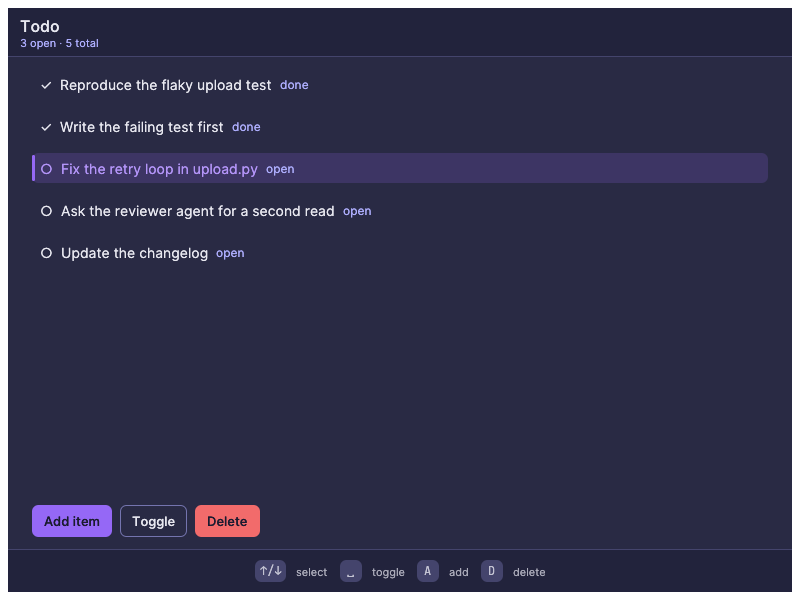
Todo
Context-scoped todo list, backed by a markdown checklist file a human or agent can edit directly.
Asks for nothing
-
Logs
Live tail of the Plexi host log, color-coded by level, with level/app/search filters.
Asks for logs.read, timer
-
GitHub Issues
GitHub Issues viewer for the workspace repo.
Asks for net.http
-
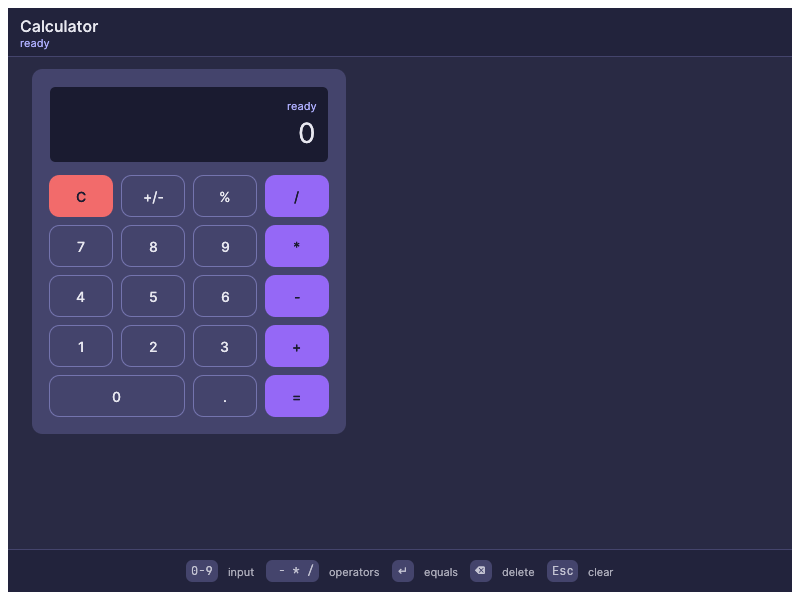
Calculator
Four-function calculator with connector tools for the Assistant.
Asks for nothing
Games
-
Sudoku
Sudoku with easy, medium, and hard difficulties. Click or use arrow keys to select cells, type 1-9 to fill, N for notes mode.
Asks for timer
-
Balls
Physics simulation — elastic circle collisions demonstrating DrawCommand::Circle.
Asks for nothing
-
Snake
Classic snake game — proves input + draw primitives.
Asks for timer
-
Breakout
Classic brick-breaking arcade game with paddle, ball, and colorful brick grid.
Asks for nothing
-
Tetris
Classic Tetris driven by the continuous WASM frame clock.
Asks for nothing
Three functions.
A plugin is init, update and view.
from plexi_sdk import log, state
from plexi_sdk.effects import SetState, SetTitle
from plexi_sdk.events import KeyEvent
from plexi_sdk.ui import SurfaceHeader, Column, FooterKeys, Text


def init(size, args):
    log.info("counter: init")
    return [SetTitle("Counter"), SetState({"count": 0})]


def update(event):
    if isinstance(event, KeyEvent) and event.key == "+" and event.pressed:
        return [SetState({"count": state.get("count", 0) + 1})]
    return []


def view():
    return Column([
        SurfaceHeader("Counter"),
        Text(str(state.get("count", 0)), bold=True, align="center"),
        FooterKeys([("+", "increment")]),
    ], grow=True)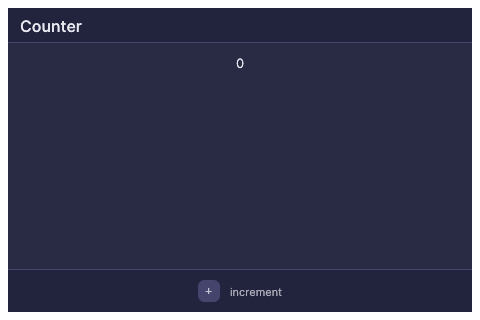
- init
- Runs once on launch and returns the starting effects.
- update
- Runs for every input event and returns effects. State changes only through those effects.
- view
- Returns the interface as a tree of components. It reads state and never writes it.
Scaffold, check, open.
Run these from inside a Plexi pane.
-
$ plexi plugin init myappWrites main.py, manifest.toml, a test, and AGENTS.md for the agent that will work on it.
-
$ plexi plugin check myapp --png-dir /tmp/myapp-shotsChecks the manifest and the SDK calls, renders the view at several sizes and saves a PNG of each.
-
$ plexi view open myappOpens the view in a split beside the pane you ran it from.
-
$ plexi view render myapp --png --output /tmp/myapp.pngRenders one frame without a window, so an agent can look at its own work.
Where a plugin runs.
Python plugins run as CPython compiled to WebAssembly, inside a Wasmtime sandbox.
The guest gets read-only mounts for its own folder, the SDK and the Python standard library. Reading your files, calling the network and reading a secret all go through host APIs, and each one is gated by a capability.
The sandbox covers plugins opened in panes. A terminal pane running python3 is an ordinary process with your permissions, and so are the type checks and tests you run while developing.