So what is it?
Panes and terminals
Split a pane with ⌘D. The new terminal opens in the directory you were in.
- Move focus with ⌘H, ⌘J, ⌘K and ⌘L. Swap a pane with its neighbour by adding Control.
- Each terminal is a full PTY that loads your shell and your dotfiles.
- A context groups the panes for one piece of work. Switch contexts and each layout is where you left it.
plexi pane new -n tests Opens a terminal pane named "tests".
Screenshot to come
Agents and their state
Claude Code and Codex run in a pane like any other CLI. Hooks tell Plexi whether each one is working, blocked or idle.
- One command installs the hooks for the agent CLI you use.
- plexi agent status prints a table of every agent pane and its state. Add --blocked to see only the ones waiting.
- Questions and approvals that wait on you are listed by plexi needs-you.
plexi agent hook install --claude-code Use --codex for Codex. Then run plexi agent status.
Screenshot to come
Plugins and views
A plugin is a folder with a manifest and three Python functions. A view is what it draws in a pane.
- plexi plugin init scaffolds the folder, the manifest and a test.
- plexi plugin check validates the plugin and can write PNG snapshots of what it renders.
- Python plugins run as CPython compiled to WebAssembly, inside a Wasmtime sandbox.
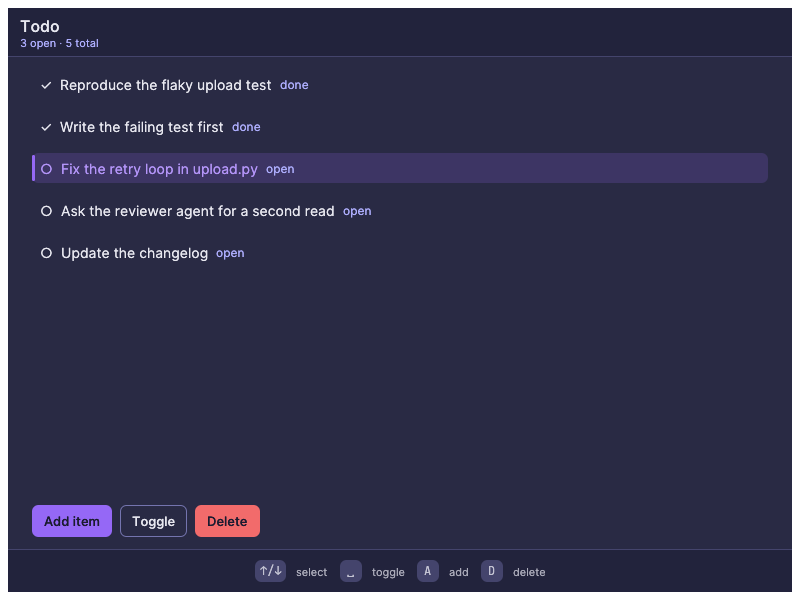
plexi view open todo Opens the bundled Todo plugin in a split to the right.
Permissions
A plugin lists the capabilities it wants in its manifest. Listing one is a request. It is not a grant.
- File access, network requests and secrets all go through host APIs and their grants.
- plexi permissions list prints the decisions Plexi has stored. revoke removes one.
- On macOS, secrets are stored through the system keychain.
plexi permissions list Prints the live permission decisions.
Screenshot to come
Notes
⌘0 opens a note over whatever you are doing. Enter saves it as a Markdown file.
- Escape closes the note without writing anything. The layout underneath does not change.
- An agent can capture a note with the same command you would type.
plexi note add "check the flaky upload test" Writes a timestamped note.
Screenshot to come
Command palette
⌘P opens the command palette. Type part of an action name and run it.
- ⌘E opens the file explorer at the directory of the terminal you were in.
- Shortcuts can be changed in config.toml.
plexi --help The same actions, listed for an agent or a script.
Screenshot to come
Install it.
curl -fsSL https://plexiapp.com/install | bash -s -- --channel beta Apple Silicon. Beta 0.5 Groundwork (0.5.0). Builds are self-signed and not notarized. What that means.